Lync 2013 Dialin Page Formatting
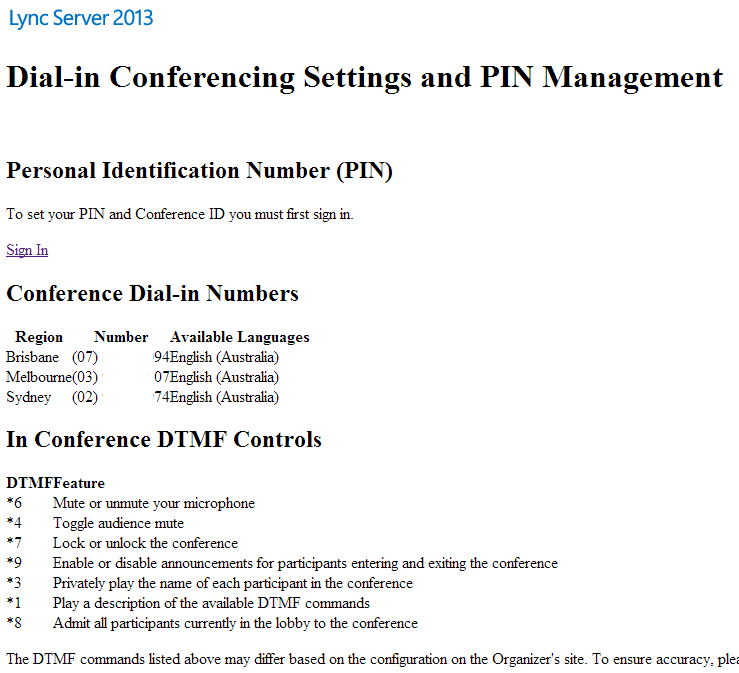
By default, the Lync 2013 dialin page, e.g. https://dialin.contoso.com, looks pretty awful. Text is rendered in default web types, and the table of available numbers is almost unreadable as all the columns are pushed together. I’ve seen other posts on repairing this issue by hacking the inline CSS to include some spacing for tables and horizontal lines, but there’s an easier way.
The problem is that the CSS file is unreachable by the web server. Technically it exists, but you’ll get a 404 if you try to browse to it directly. I could go digging around in IIS to figure out why this is the case, but I’m horribly lazy. The simplest way to repair the problem is as follows:
- On your Lync Frontend, open notepad as administrator
- Select File>Open and browse to C:\Program Files\Microsoft Lync Server 2013\Web Components\Dialin Page\Ext
- Change the file type from txt to all files and open Conference.aspx
- Locate the following line:
dialin/client/App_LocalResources/PSTN_info_styles.<% =CurrentLanguage %>.css" rel="stylesheet" type="text/css" />
- Delete /App_LocalResources so the line now looks like this:
dialin/client/PSTN_info_styles.<% =CurrentLanguage %>.css" rel="stylesheet" type="text/css" />
- Double check to see if the PSTN_info_styles.*.css files are in C:\Program Files\Microsoft Lync Server 2013\Web Components\Dialin Page\Ext\client - if they’re not there, copy them (or at least the one for your language) from the App_LocalResources folder and paste them in the client folder.
- Save the file and repeat the process for any other Lync 2013 Front End servers in your pool(s)
Your dialin page should now look like this:

While it’s not a huge improvement, at least the sans-serif fonts will make things a little easier on the eye, and stop your dialin page from looking like it’s from the 90s.
-astro.